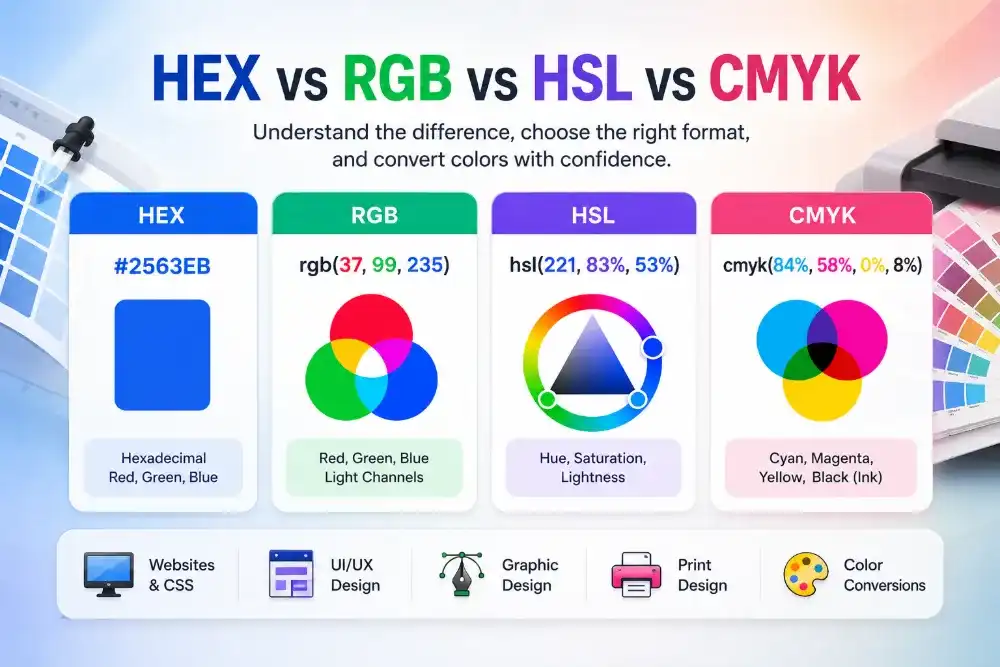
A designer sends you #2563EB, but your application expects RGB. A CSS effect is easier to create with HSL. Later, the same brand color needs a CMYK estimate for a printed brochure.
The visible color may stay similar, but the format required by each job changes.
This guide shows you how to convert color formats online using Solvioza’s bidirectional color converters. It also explains the mathematical calculations behind HEX, RGB, HSL, and CMYK conversion, so you can understand where the results come from instead of treating them as unexplained values.
Choose the Conversion You Need
| Starting format | Required format | Tool to use |
|---|---|---|
| HEX | RGB or RGBA | HEX to RGB Color Converter |
| RGB | HEX | RGB to HEX Color Converter |
| RGB | HSL | RGB to HSL Color Converter |
| HSL | RGB | HSL to RGB Color Converter |
| RGB | CMYK | RGB to CMYK Color Converter |
| CMYK | RGB | CMYK to RGB Color Converter |
All three Solvioza tools work in both directions. You can enter values on either side and see the converted color immediately.
How to Convert HEX to RGB Online
HEX is commonly used in CSS, brand guides, and design files. RGB expresses the same screen color using separate red, green, and blue channels.
To convert HEX to RGB:
- Open the HEX to RGB Color Converter.
- Enter a six-digit HEX value, with or without the
#symbol. - Review the converted red, green, and blue values.
- Use the copy button to copy the formatted RGB result.
For example:
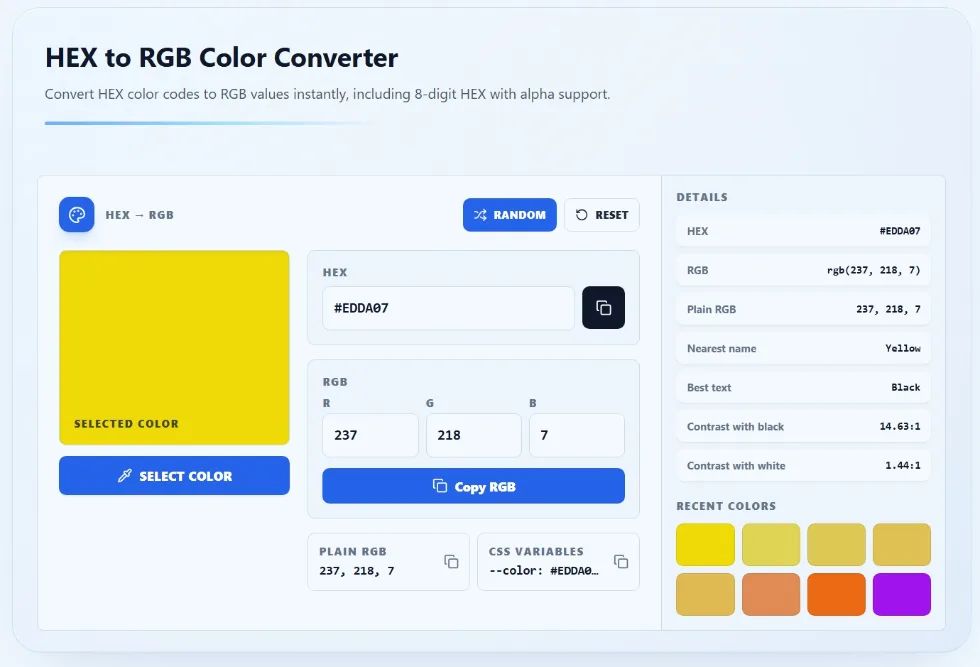
HEX: #EDDA07
RGB: rgb(237, 218, 7)
The converter also accepts eight-digit HEX colors containing an alpha channel. When transparency is present, it provides an RGBA result and the corresponding alpha value.
The Mathematics Behind HEX to RGB Conversion
A six-digit HEX color contains three pairs:
#25 63 EB
  R  G  B
Each pair is a hexadecimal number. Hexadecimal uses 16 symbols:
0, 1, 2, 3, 4, 5, 6, 7, 8, 9, A, B, C, D, E, F
The letters represent values from 10 to 15. To convert a two-character HEX pair into decimal, multiply the first digit by 16 and add the second digit.
For #2563EB, the calculation is:
Red:   2 × 16 + 5  = 37
Green: 6 × 16 + 3  = 99
Blue:  14 × 16 + 11 = 235
In the blue pair EB, E equals 14 and B equals 11.
The final RGB value is therefore:
rgb(37, 99, 235)
How to Convert RGB to HEX Online
The same Solvioza tool can convert in the opposite direction.
- Open the HEX and RGB Converter.
- Enter values for the red, green, and blue channels.
- Keep each channel between 0 and 255.
- Copy the generated HEX value.
Entering 37, 99, and 235 produces #2563EB.
The Mathematics Behind RGB to HEX Conversion
Each RGB channel is divided by 16. The quotient becomes the first HEX digit, while the remainder becomes the second.
For the red channel, 37:
37 ÷ 16 = 2 remainder 5
Decimal 37 = HEX 25
For the green channel, 99:
99 ÷ 16 = 6 remainder 3
Decimal 99 = HEX 63
For the blue channel, 235:
235 ÷ 16 = 14 remainder 11
14 = E
11 = B
Decimal 235 = HEX EB
Combine the three pairs:
25 + 63 + EB = #2563EB
This is why converting between HEX and RGB normally does not alter a color. Both formats describe the same red, green, and blue channels using different number systems.
Convert HEX Colors With Transparency
An eight-digit HEX color adds an alpha pair after the usual red, green, and blue values:
#RRGGBBAA
For example:
#2563EB80
The final pair, 80, is the alpha value. Convert it to decimal and divide by 255:
HEX 80 = decimal 128
128 ÷ 255 ≈ 0.50
The approximate RGBA result is:
rgba(37, 99, 235, 0.50)
Alpha values run from 00 for fully transparent to FF for fully opaque.
How to Convert RGB to HSL Online
HSL separates a color into hue, saturation, and lightness. This can make related shades and interface states easier to create.
To perform the conversion:
- Open the RGB to HSL Color Converter.
- Enter the red, green, and blue values.
- Review the calculated hue, saturation, and lightness.
- Copy the formatted HSL value or one of the additional color formats.
Our example becomes:
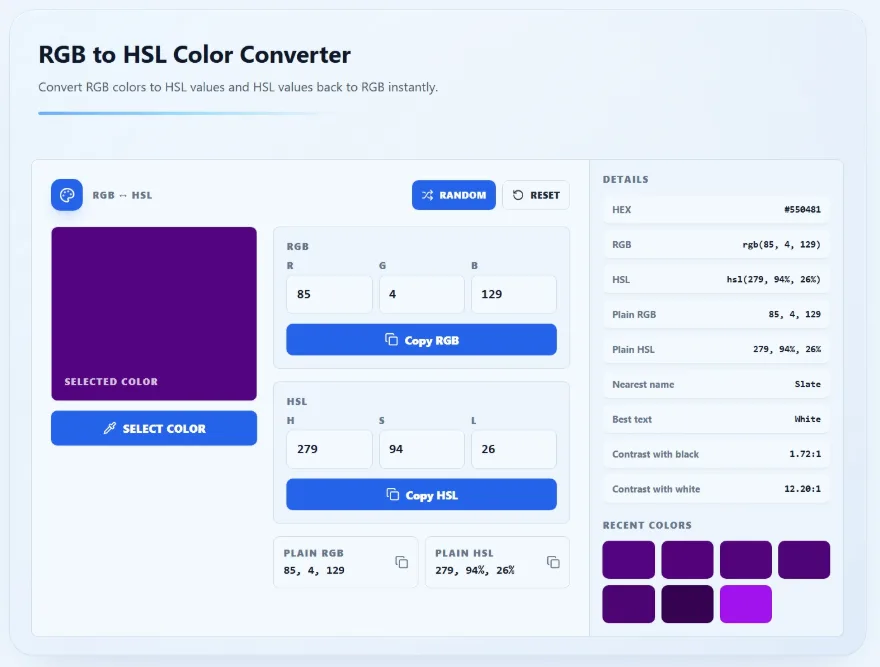
RGB: rgb(85, 4, 129)
HSL: hsl(279, 94%, 26%)
The Mathematics Behind RGB to HSL Conversion
The RGB channels must first be normalized from the 0–255 range to the 0–1 range:
R' = R ÷ 255
G' = G ÷ 255
B' = B ÷ 255
For rgb(37, 99, 235):
R' = 37 ÷ 255  ≈ 0.145
G' = 99 ÷ 255  ≈ 0.388
B' = 235 ÷ 255 ≈ 0.922
Next, identify the largest and smallest normalized values:
Maximum = 0.922
Minimum = 0.145
Difference = 0.922 - 0.145 = 0.777
Calculating Lightness
Lightness is the average of the maximum and minimum values:
L = (maximum + minimum) ÷ 2
L = (0.922 + 0.145) ÷ 2
L ≈ 0.533, or 53%
Calculating Saturation
When the maximum and minimum are different, saturation is calculated according to the lightness:
If L ≤ 0.5:
S = difference ÷ (maximum + minimum)

If L > 0.5:
S = difference ÷ (2 - maximum - minimum)
Our lightness is greater than 0.5:
S = 0.777 ÷ (2 - 0.922 - 0.145)
S ≈ 0.833, or 83%
Calculating Hue
The hue formula depends on which RGB channel is the largest:
If red is largest:
H = 60 × (((G' - B') ÷ difference) mod 6)

If green is largest:
H = 60 × (((B' - R') ÷ difference) + 2)

If blue is largest:
H = 60 × (((R' - G') ÷ difference) + 4)
Blue is the largest channel in this example:
H = 60 × (((0.145 - 0.388) ÷ 0.777) + 4)
H ≈ 221°
Combining the results gives:
hsl(221, 83%, 53%)
Converters round values for readability, so a manual calculation may differ by one unit depending on the rounding stage.
How to Convert HSL to RGB Online
You may need HSL to RGB conversion when an image tool, software package, or API accepts RGB channels instead of HSL.
- Open the RGB and HSL Converter.
- Enter a hue from 0 to 360.
- Enter saturation and lightness from 0% to 100%.
- Copy the resulting RGB value.
As you change any HSL channel, Solvioza updates the color preview and RGB output immediately.
The Mathematics Behind HSL to RGB Conversion
First, convert saturation and lightness percentages into decimal values and normalize the hue:
S' = S ÷ 100
L' = L ÷ 100
H' = H ÷ 360
The conversion then calculates two temporary values:
If L' < 0.5:
q = L' × (1 + S')

Otherwise:
q = L' + S' - (L' × S')

p = 2 × L' - q
The red, green, and blue channels are found by evaluating the hue at three positions:
Red position   = H' + 1/3
Green position = H'
Blue position  = H' - 1/3
Each result is adjusted around the circular hue range, transformed using p and q, and multiplied by 255.
This formula is less convenient to calculate by hand. An online RGB and HSL converter is useful when you need exact channel values quickly.
How to Convert RGB to CMYK Online
CMYK represents cyan, magenta, yellow, and black ink percentages. It is mainly used when preparing colors for print-related work.
- Open the RGB to CMYK Color Converter.
- Enter red, green, and blue values between 0 and 255.
- Review the cyan, magenta, yellow, and black percentages.
- Copy the formatted or plain CMYK result.
For example:
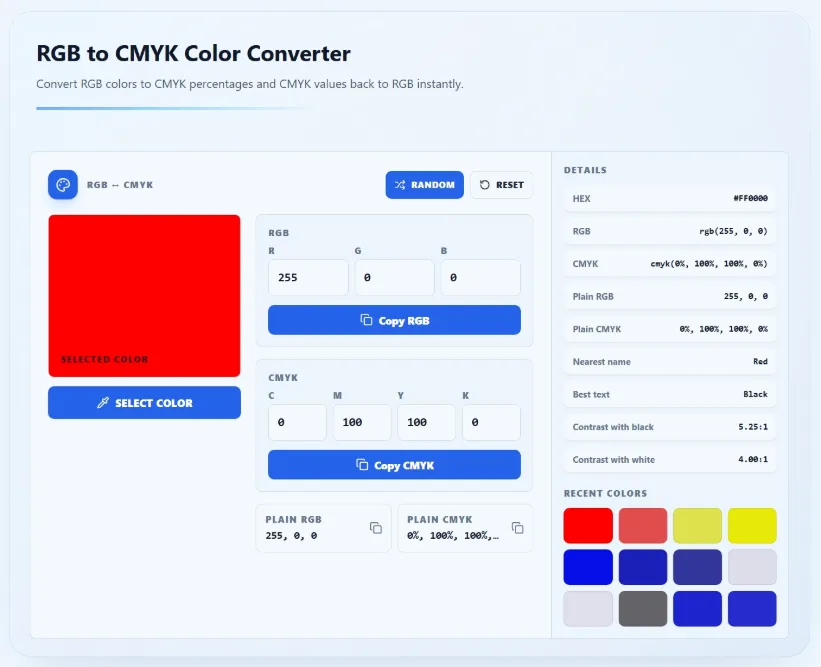
RGB: rgb(255, 0, 0)
CMYK: cmyk(0%, 100%, 100%, 0%)
The Mathematics Behind RGB to CMYK Conversion
Begin by normalizing the RGB values:
R' = R ÷ 255
G' = G ÷ 255
B' = B ÷ 255
Using rgb(37, 99, 235):
R' ≈ 0.145
G' ≈ 0.388
B' ≈ 0.922
Calculate the black channel:
K = 1 - maximum(R', G', B')
K = 1 - 0.922
K ≈ 0.078, or 8%
Then calculate cyan, magenta, and yellow:
C = (1 - R' - K) ÷ (1 - K)
M = (1 - G' - K) ÷ (1 - K)
Y = (1 - B' - K) ÷ (1 - K)
For this color:
C = (1 - 0.145 - 0.078) ÷ 0.922 ≈ 0.843, or 84%
M = (1 - 0.388 - 0.078) ÷ 0.922 ≈ 0.579, or 58%
Y = (1 - 0.922 - 0.078) ÷ 0.922 = 0, or 0%
The rounded result is:
cmyk(84%, 58%, 0%, 8%)
Pure black is a special case. When red, green, and blue are all zero, K is 100%, while C, M, and Y are set to 0% to avoid division by zero.
How to Convert CMYK to RGB Online
The conversion can also run in reverse when you need a screen-based approximation of a CMYK color.
- Open the RGB and CMYK Converter.
- Enter cyan, magenta, yellow, and black values from 0% to 100%.
- Review the generated RGB and HEX results.
- Copy the format needed by your digital project.
The Mathematics Behind CMYK to RGB Conversion
Convert the CMYK percentages into decimal values first. The RGB channels are then calculated as follows:
R = 255 × (1 - C) × (1 - K)
G = 255 × (1 - M) × (1 - K)
B = 255 × (1 - Y) × (1 - K)
Using cmyk(84%, 58%, 0%, 8%):
C = 0.84
M = 0.58
Y = 0
K = 0.08

R = 255 × (1 - 0.84) × (1 - 0.08) ≈ 38
G = 255 × (1 - 0.58) × (1 - 0.08) ≈ 99
B = 255 × (1 - 0) × (1 - 0.08) ≈ 235
The result is approximately:
rgb(38, 99, 235)
The red channel differs slightly from the original value of 37 because CMYK percentages were rounded before being converted back. This is a normal example of conversion rounding.
Why RGB and CMYK Results Are Only an Approximation
HEX, RGB, and HSL can describe the same digital color through different notation. CMYK is different because it represents ink rather than light.
A simple mathematical conversion cannot account for every printer, paper type, ink set, or color profile. The Solvioza converter is useful for quick estimates and general preparation, but it does not replace a print shop’s required ICC profile or professional proofing process.
If a design will be commercially printed, ask the printer which color profile and export settings they expect.
How to Get the Original Color Value
You do not always begin with a written HEX or RGB value. Sometimes the color exists inside a design, photograph, logo, or another application.
Use the Screen Color Picker when the color is already visible on your screen. It can return HEX, RGB, and HSL values from a visible interface or design.
If the color is inside an image file, upload it to the Image Color Picker. You can click a specific pixel, copy its values, and extract a small palette from the image.
Once you have a starting value, open the appropriate converter for the destination format.
Common Color Conversion Mistakes
Entering RGB values outside the valid range. Standard RGB channels must remain between 0 and 255.
Using values above 100% in HSL or CMYK. Saturation, lightness, and CMYK channels are normally limited to 0–100%.
Confusing HSL lightness with opacity. Lightness changes how light or dark a color appears. It does not make the color transparent.
Dropping the alpha channel. A transparent eight-digit HEX color needs RGBA or another alpha-supporting format if its opacity must be preserved.
Expecting rounded conversions to reverse perfectly. Converting rounded HSL or CMYK values back into RGB can produce a small difference.
Treating generic CMYK percentages as a complete print specification. Professional printing also depends on color profiles, materials, and production settings.
Build a Palette After Converting Your Color
A converted value is still only one color. If you need matching backgrounds, accents, button states, or supporting shades, place the result into the Color Palette Generator.
You can create monochromatic, analogous, complementary, triadic, and other palette types. Colors can be locked, shuffled, saved as favorites, and exported as HEX values, CSS variables, Tailwind objects, JSON, SCSS, TXT, or PNG.
This is useful when a client gives you one brand color and you need to turn it into a practical website color system.
Use the Right Converter for the Job
Use the HEX and RGB Converter for CSS values, RGB channels, transparency, and developer handoff.
Use the RGB and HSL Converter when you want to understand or adjust hue, saturation, and lightness.
Use the RGB and CMYK Converter when you need an estimated conversion between screen color and ink percentages.
The calculations behind these formats are useful to understand, but you should not have to perform them manually every time. Enter the known value, check the live preview, copy the result, and keep the original color recorded in case the destination requirements change later.