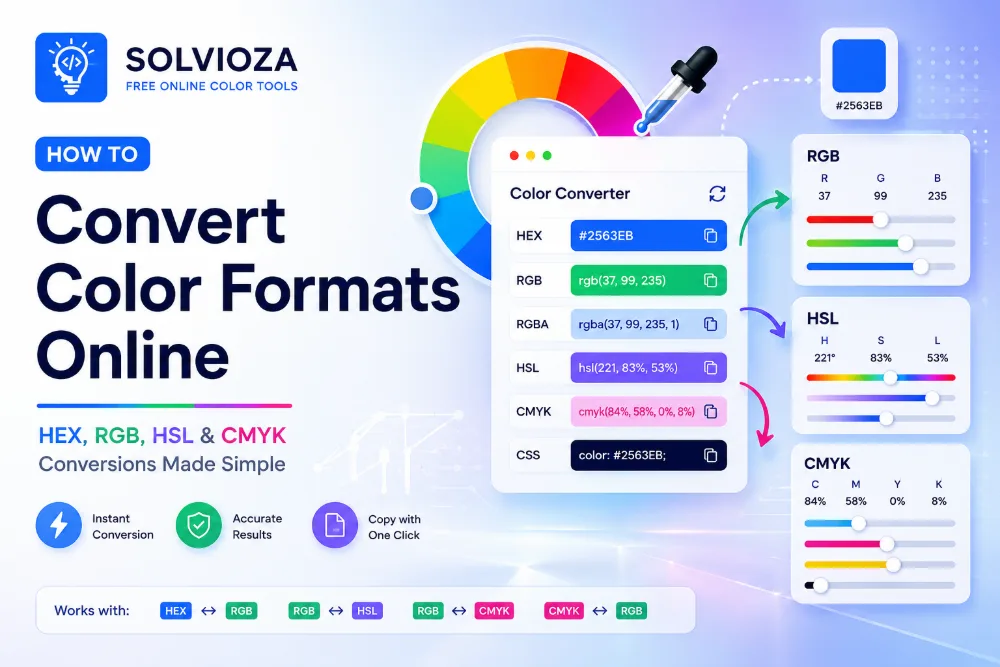
A color can look identical on your screen while being written in several completely different ways.
The blue #2563EB, for example, can also be expressed as rgb(37, 99, 235) or hsl(221, 83%, 53%). Move that color into a print workflow, and it may be represented with CMYK percentages instead.
These formats are not competing versions of color. They describe color for different systems and different kinds of work.
This guide explains HEX vs RGB vs HSL vs CMYK in practical terms, including which format is best for websites, CSS, UI design, graphic design, and print. You will also learn when converting between color formats is useful and when a direct conversion may not tell the whole story.
HEX, RGB, HSL, and CMYK at a Glance
| Color format | How it represents color | Typical example | Best suited for |
|---|---|---|---|
| HEX | Hexadecimal red, green, and blue values | #2563EB |
Websites, CSS, design systems, and developer handoff |
| RGB | Red, green, and blue light channels | rgb(37, 99, 235) |
Screens, digital graphics, UI design, and CSS |
| HSL | Hue, saturation, and lightness | hsl(221, 83%, 53%) |
Adjusting colors, creating variations, and CSS |
| CMYK | Cyan, magenta, yellow, and black ink percentages | cmyk(84%, 58%, 0%, 8%) |
Commercial printing and print-focused design |
The most important difference is simple: HEX, RGB, and HSL are primarily used for digital color, while CMYK is intended for printing with ink.
What Is a HEX Color?
HEX is a compact way to write an RGB color using hexadecimal characters. It is one of the most familiar color formats in web design and development.
A standard HEX color begins with a hash symbol followed by six characters:
#RRGGBB
The first two characters represent red, the next two represent green, and the final two represent blue. Each pair can range from 00, meaning none of that channel, to FF, meaning its maximum intensity.
Here are a few simple examples:
#FF0000is red.#00FF00is green.#0000FFis blue.#FFFFFFis white.#000000is black.
Shorthand HEX uses three characters when each pair contains matching digits. For example, #FFF is the short form of #FFFFFF.
HEX can also include transparency. An eight-digit value such as #2563EB80 contains the usual red, green, and blue values followed by an alpha value.
When Is HEX the Best Choice?
HEX is especially convenient when you need short, portable color values. It works well in CSS, design specifications, brand documentation, and developer handoff.
Designers often share brand colors as HEX because the values are easy to copy and recognize. Developers can place the same values directly into stylesheets, component themes, and design tokens.
If you have a HEX value but need its individual red, green, and blue channels, use the HEX to RGB Color Converter. The Solvioza tool converts in both directions, supports six-digit and eight-digit HEX values, and provides copyable RGB, RGBA, and CSS values.
What Is RGB?
RGB stands for red, green, and blue. It describes colors by combining different intensities of these three channels of light.
Each channel normally uses a number from 0 to 255:
rgb(red, green, blue)
For example:
rgb(37, 99, 235)
This color contains 37 units of red, 99 units of green, and 235 units of blue.
When every channel is set to 0, the result is black. When all three channels are set to 255, the result is white. Other combinations produce the colors between them.
Why Screens Use RGB
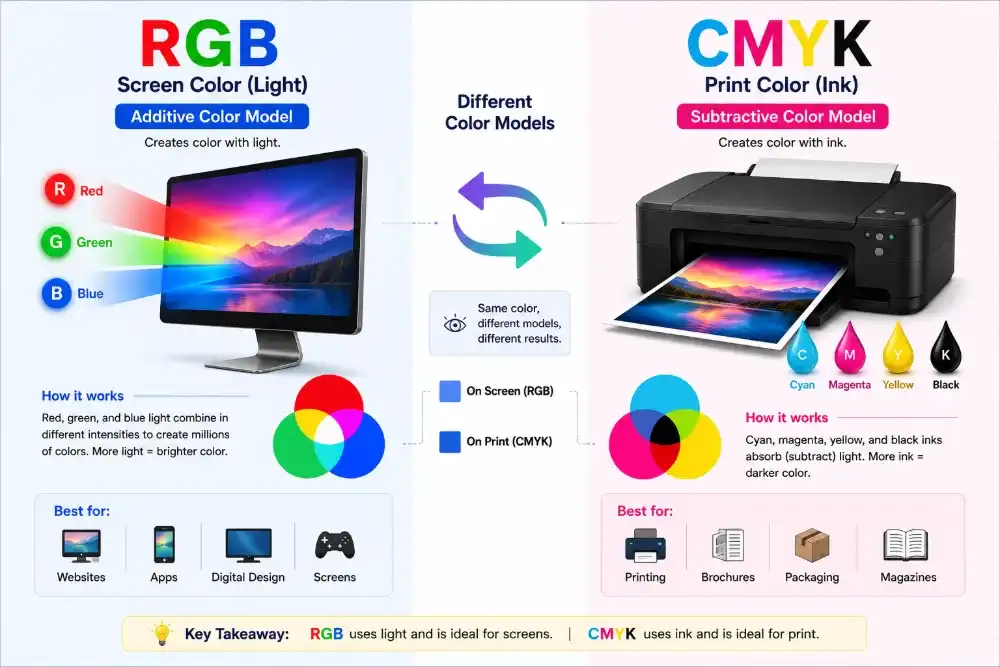
Phones, monitors, televisions, and other digital displays create color with light. Their pixels use red, green, and blue components, which is why RGB is the natural model for screen-based work.
RGB is an additive color model. The more colored light you add, the closer the result moves toward white.
This is the opposite of working with ink. Adding more ink usually makes a printed result darker, which is one reason CMYK is used for print instead.
RGB and RGBA: What Is the Difference?
RGBA is RGB with an additional alpha value for transparency.
rgba(37, 99, 235, 0.5)
In this example, 0.5 makes the color 50% opaque. An alpha value of 0 is fully transparent, while 1 is fully opaque.
Modern CSS can also express transparency using newer RGB syntax, but RGBA remains widely recognized and easy to understand.
HEX vs RGB: Is One Better?
HEX and RGB can represent the same screen colors. In most web projects, choosing between them is mainly about readability and workflow.
| Use HEX when | Use RGB when |
|---|---|
| You want a compact color value | You need to see or adjust individual color channels |
| You are documenting brand colors | You are working with channel-based calculations |
| You are defining standard CSS colors | You need a familiar transparency value with RGBA |
| You are handing colors from design to development | You are processing digital image or pixel data |
Converting HEX to RGB does not normally change the visible color. It changes the notation used to describe it.
What Is HSL?
HSL stands for hue, saturation, and lightness. It describes color in a way that often feels more natural when adjusting a design.
hsl(221, 83%, 53%)
Each part controls a different characteristic:
- Hue: The basic color, represented as an angle from 0 to 360 degrees.
- Saturation: The intensity of the color, from 0% to 100%.
- Lightness: How light or dark the color is, from 0% to 100%.
A saturation of 0% removes the visible hue and produces gray. A lightness of 0% produces black, while 100% produces white.
Why HSL Is Useful for Website and UI Design
RGB tells you how much red, green, and blue a color contains. HSL makes it easier to ask practical design questions:
- What would this color look like if it were lighter?
- Can I make it less intense without changing its basic hue?
- How can I create a darker hover state?
- Can I build several related shades from one brand color?
For example, you can keep the same hue and saturation while changing only the lightness:
hsl(221, 83%, 43%)
hsl(221, 83%, 53%)
hsl(221, 83%, 63%)
That makes HSL useful for buttons, hover states, backgrounds, borders, and other related interface colors.
The RGB to HSL Color Converter lets you edit either set of channels and immediately see the matching color. It also provides HEX output, contrast details, recent colors, and copyable CSS values.
HSL vs RGB: Which Should You Use?
RGB is closer to the way screens produce color. HSL is often easier for people to adjust deliberately.
Use RGB when working with image data, pixels, browser APIs, or software that provides red, green, and blue channels. Use HSL when you want to create related colors by changing hue, saturation, or lightness.
Both formats work in CSS. One is not inherently more accurate for ordinary website styling; they simply offer different ways to describe the same digital color.
What Is CMYK?
CMYK stands for cyan, magenta, yellow, and key, with “key” referring to black. It is the color model commonly associated with commercial printing.
CMYK values are usually written as percentages:
C: 84%
M: 58%
Y: 0%
K: 8%
A printing process combines these inks to reproduce the intended color on paper or another physical material.
CMYK is a subtractive color model. Ink absorbs parts of the light that would otherwise reflect from the page. As more ink is added, the result generally becomes darker.
Why Does CMYK Include Black Ink?
In theory, combining cyan, magenta, and yellow should create black. In real printing, the result may appear muddy or dark brown rather than producing a clean, neutral black.
Black ink improves dark areas, text sharpness, contrast, and control over ink usage. It is also more practical than building every dark element from three separate inks.
RGB vs CMYK: Screen Color and Print Color
RGB and CMYK are designed for different physical processes.
| RGB | CMYK |
|---|---|
| Uses red, green, and blue light | Uses cyan, magenta, yellow, and black ink |
| Designed for screens | Designed for printing |
| Additive color model | Subtractive color model |
| Can display bright screen colors | Has a print-dependent reproducible range |
| Common in websites and digital graphics | Common in brochures, packaging, posters, and business cards |
Some vivid RGB colors cannot be reproduced exactly with standard CMYK inks. Bright blues, greens, and highly saturated colors are common examples. A design may therefore look slightly duller or different after being prepared for print.
An Important Limitation of RGB to CMYK Conversion
A basic RGB to CMYK converter provides a useful mathematical conversion, but professional print output depends on more than four percentages.
The final appearance can be affected by the printer, ink, paper, color profile, printing process, and software settings. Two print shops may not produce exactly the same result from a generic CMYK value.
Use the RGB to CMYK Color Converter for quick estimates, planning, and understanding channel values. For a commercial print job, confirm the required color profile and file settings with the printer before approving the final design.
Which Color Format Is Best for Each Type of Work?
| Use case | Recommended format | Why |
|---|---|---|
| Website colors | HEX, RGB, or HSL | All three describe digital color and work in CSS |
| CSS variables | HEX, RGB, or HSL | The best choice depends on how the colors will be reused or adjusted |
| UI design | HEX or HSL | HEX is easy to share; HSL is convenient for creating related states |
| Digital illustration | RGB | The finished work is intended for a screen |
| Brand documentation | HEX, RGB, and CMYK | Digital and print applications may require separate values |
| Social media graphics | RGB | Social platforms display content on screens |
| Commercial printing | CMYK | The design must be prepared for an ink-based process |
| Color calculations | RGB or HSL | Individual channels can be processed or adjusted predictably |

Which Color Format Is Best for the Web?
HEX, RGB, and HSL are all suitable for modern websites. Browsers convert them into the colors displayed on screen.
HEX is often the simplest option for fixed brand colors:
color: #2563EB;
RGB is useful when channel values or transparency are part of the workflow:
background-color: rgba(37, 99, 235, 0.15);
HSL is convenient when related variations need to remain easy to understand:
--primary: hsl(221, 83%, 53%);
--primary-hover: hsl(221, 83%, 43%);
--primary-soft: hsl(221, 83%, 93%);
CMYK is not the normal choice for styling a webpage. A website is displayed with screen color, not printed ink.
Which Color Format Is Best for UI Design?
HEX remains common in UI design because it is compact and widely supported by design applications. It is also easy to pass from a design file into CSS.
HSL becomes valuable when building systematic color families. A designer can preserve a hue while adjusting saturation and lightness for buttons, backgrounds, hover states, disabled controls, and dark mode.
RGB is useful when a tool, image, or API provides channel values directly. Many teams store HEX values in their design system while using RGB or HSL during calculation and experimentation.
If you need several coordinated colors rather than a single conversion, the Color Palette Generator can create monochromatic, analogous, complementary, triadic, and other color relationships. It also checks contrast with black and white and exports palettes for design and development.
Which Color Format Is Best for Graphic Design?
The answer depends on where the finished graphic will appear.
Use RGB when creating graphics for websites, applications, online advertisements, presentations, social media, or video. These designs are primarily viewed on screens.
Use the CMYK workflow requested by your printer when preparing brochures, packaging, business cards, posters, or other professionally printed materials.
If one design will be used both online and in print, keep separate export versions. The screen version can remain in RGB, while the print version should be prepared according to the printer’s specifications.
How to Find a Color Before Converting It
Sometimes the first challenge is not choosing a format. It is finding the original color value.
If the color is already visible on your display, use the Screen Color Picker to select it from a visible webpage, application, or design. The result includes HEX, RGB, and HSL values that can be copied immediately.
If the color is inside an uploaded photograph, logo, screenshot, or illustration, the Image Color Picker is more suitable. It lets you select an exact pixel and can also extract a simple palette from the image.
Once you have the original value, choose the appropriate converter based on the destination format.
When Should You Convert Between Color Formats?
Conversion is useful when another tool, developer, client, or production process requires a different notation.
- Convert HEX to RGB when you need individual red, green, and blue channels.
- Convert RGB to HEX when you need a shorter value for CSS or documentation.
- Convert RGB to HSL when you want to adjust hue, intensity, or lightness more intuitively.
- Convert HSL to RGB when another application accepts RGB values but not HSL.
- Convert RGB to CMYK when estimating how a digital color translates into ink percentages.
- Convert CMYK to RGB when preparing a screen-based approximation of a print color.
Do not convert a value simply because another format appears more professional. Use the format that fits the destination and makes the work easier to maintain.
Does Converting a Color Change Its Appearance?
Conversions between HEX, RGB, and HSL should normally preserve the same digital color, apart from occasional rounding differences. These formats can describe the same underlying RGB result.
RGB and CMYK are different. Converting between them may produce an approximation because screens and printing systems do not reproduce the same range of colors.
Transparency can also be lost if you move from RGBA or eight-digit HEX into a format that does not include an alpha channel. Check whether opacity needs to be saved separately.
Common Color Format Mistakes
Sending HEX values as the only specification for print. HEX is a screen-oriented notation. Ask the printer which CMYK profile or document settings are required.
Assuming RGB and CMYK have identical color ranges. Some bright RGB colors cannot be reproduced exactly with standard printing inks.
Removing the percent signs from HSL saturation and lightness. Hue is an angle, but saturation and lightness are percentages.
Confusing lightness with transparency. A lighter HSL color is not transparent. Transparency is controlled separately with an alpha value.
Ignoring contrast after conversion. A technically correct color value can still produce unreadable text. Always test foreground and background colors together.
Trusting an uncalibrated screen as an exact print preview. Monitor settings, paper, ink, and lighting all affect the final appearance.
A Practical Color Workflow
- Capture or choose the original color.
- Keep the master value in a digital format such as HEX or RGB.
- Use HSL when creating lighter, darker, or less saturated variations.
- Build related colors with the Color Palette Generator.
- Check text contrast before using the colors in an interface.
- Convert values only when a tool or destination requires another format.
- Prepare a separate CMYK version for professional printing.
- Confirm print profiles and proofing requirements with the printer.
This keeps the digital palette consistent while allowing print colors to be handled as a separate production requirement.
Choosing the Right Color Format
HEX is compact and convenient for websites. RGB matches the way screens produce color. HSL makes deliberate color adjustments easier. CMYK prepares designs for ink-based printing.
There is no single format that is best for every project. The right choice depends on where the color will be used and whether it will be displayed with light or reproduced with ink.
For quick conversions, Solvioza provides a HEX and RGB Converter, an RGB and HSL Converter, and an RGB and CMYK Converter. Each tool supports conversion in both directions, displays a live preview, and provides copyable values for practical use.
Once you understand what each format represents, choosing between HEX, RGB, HSL, and CMYK becomes much less confusing: use digital color formats for screens, CMYK for print preparation, and conversion only when the workflow calls for it.